
Koristite zastareli preglednik. Možda se neće pravilno prikazivati ova ili druge veb stranice.
Trebalo bi da nadogradite ili koristite alternativni preglednik.
Trebalo bi da nadogradite ili koristite alternativni preglednik.
Flash biosa
- Začetnik teme SIMON
- Datum pokretanja

- Učlanjen(a)
- 22.02.2005
- Poruke
- 379
- Poena
- 319
1. Identify your motherboard's model and version by examining the label on the last slot.
2. Check the current BIOS ID.
3. Download the appropriate BIOS file.
4. Self-extract the BIOS file by double clicking the downloaded file.
5. Make a bootable floppy disk and copy the necessary files onto it.
6. Boot from the floppy disk.
7. FLASH BIOS
8. CLEAR CMOS DATA
In the BIOS, set "floppy" first in the boot sequence. (save and exit)
After booting from the floppy, flash the BIOS in pure DOS mode by following instructions:
Tha case of AWARD BIOS
If the self-extract file in step.4 extracts the .BIN file only (step 4.a, 5.a) , excute awdflash.exe by this way please.
A:\>awdflash BD72_AJ.BIN /py /sn /cd /cp /cc /cks /R
Otherwise the self-extrat file should extract 5 files which including runme.bat (step 4.b, 5.b). Just execute runme.bat by typing "runme" and enter.
The case of AMI BIOS
A:\>AMIFLASH SR7_A8.ROM
or execute RUNME.BAT by typing "RUNME" and enter.
8. CLEAR CMOS DATA
Switch off the power supply unit or pull off the power cord. There is a CCMOS jumper near the battery. Change the jumper position from default 1-2 to 2-3 for one minute to discharge the CMOS data, and then put it back to default 1-2. Switch on the power supply unit or pull in the power cord. Press the power-on button to boot up system. If it works, hit "Del" key to enter the BIOS setup page to do correct settings.
2. Check the current BIOS ID.
3. Download the appropriate BIOS file.
4. Self-extract the BIOS file by double clicking the downloaded file.
5. Make a bootable floppy disk and copy the necessary files onto it.
6. Boot from the floppy disk.
7. FLASH BIOS
8. CLEAR CMOS DATA
In the BIOS, set "floppy" first in the boot sequence. (save and exit)
After booting from the floppy, flash the BIOS in pure DOS mode by following instructions:
Tha case of AWARD BIOS
If the self-extract file in step.4 extracts the .BIN file only (step 4.a, 5.a) , excute awdflash.exe by this way please.
A:\>awdflash BD72_AJ.BIN /py /sn /cd /cp /cc /cks /R
Otherwise the self-extrat file should extract 5 files which including runme.bat (step 4.b, 5.b). Just execute runme.bat by typing "runme" and enter.
The case of AMI BIOS
A:\>AMIFLASH SR7_A8.ROM
or execute RUNME.BAT by typing "RUNME" and enter.
8. CLEAR CMOS DATA
Switch off the power supply unit or pull off the power cord. There is a CCMOS jumper near the battery. Change the jumper position from default 1-2 to 2-3 for one minute to discharge the CMOS data, and then put it back to default 1-2. Switch on the power supply unit or pull in the power cord. Press the power-on button to boot up system. If it works, hit "Del" key to enter the BIOS setup page to do correct settings.


Instalacija aplikacije
How to install the app on iOS
Follow along with the video below to see how to install our site as a web app on your home screen.
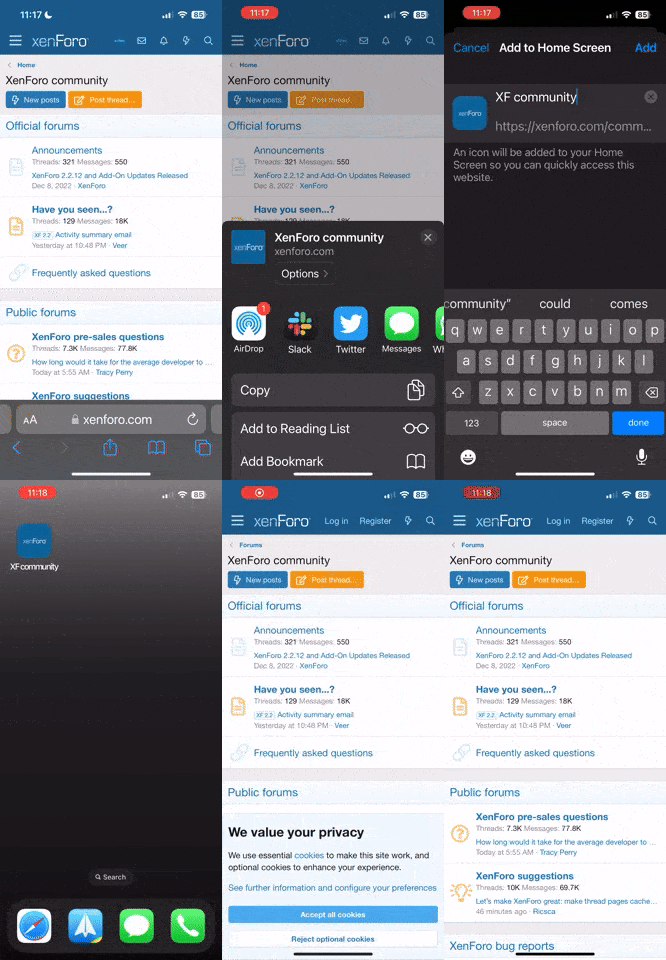
Napomena: this_feature_currently_requires_accessing_site_using_safari